Integrating to Profinity
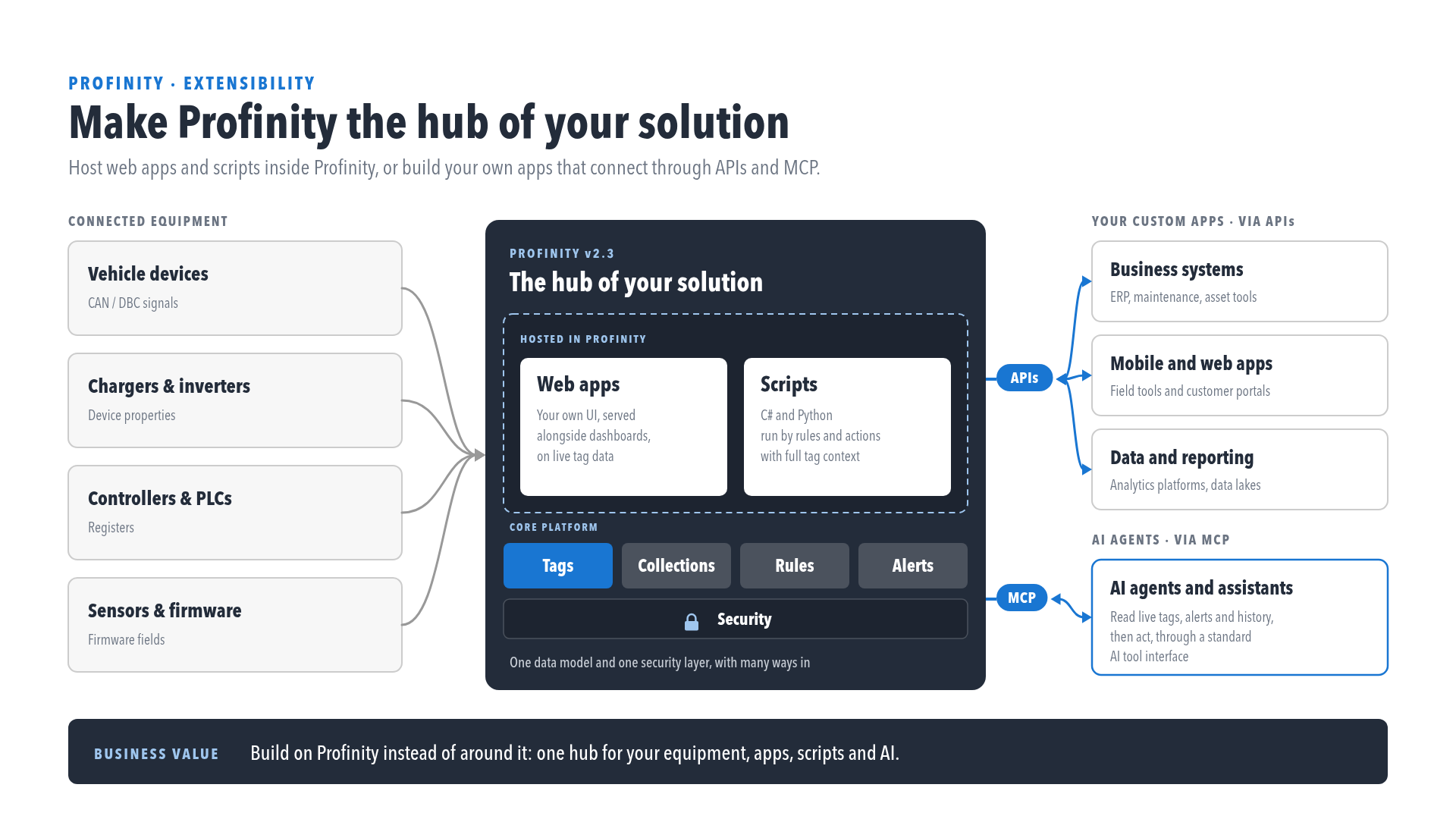
Connected equipment feeds into Profinity, which hosts web apps and scripts on top of its core platform (Tags, Collections, Rules, Alerts) behind Security. Profinity exposes that platform through REST APIs to business systems and applications, and through the Model Context Protocol (MCP) to AI agents.
APIs
Profinity provides RESTful interfaces to integrate with and extend its functionality. The APIs are secured with Bearer tokens and use JSON, so custom applications can be built on them, or existing applications extended with them. They expose both real-time and historical data, so Profinity can be connected to other systems, to custom dashboards and to new applications built on Profinity's data.
Swagger documents the available APIs and how to call them, and the OpenAPI document that tools can import is at /swagger/v2/swagger.json.
The Endpoint Reference lists the routes that complement the screens described elsewhere in the documentation.
To make a first authenticated call, follow Make your first API call.
MCP server
Profinity includes an MCP server, which lets AI assistants (such as AI Chat) and other MCP-aware tools query system data and metadata.
The server exposes ten read-only tools for tag discovery, tag values and history, and alert state, over Streamable HTTP at /api/v2/Ai/Mcp.
An MCP client can use it to answer questions about live tags and alerts, to pull history into an analysis tool, or to feed a monitoring or reporting system, all with the permissions of the account it authenticates as.
Refer to MCP Server for how to connect and authenticate, and to the MCP tool reference for the full list of tools.
Other ways to move data
APIs and MCP are for systems that call Profinity. Data can also be pushed out of or into a Profinity instance without a custom client. MQTT Publisher and Webhook Publisher components send tag values to other systems, and MQTT Subscriber brings values in. Tag Relay shares live tags between Profinity instances, and the receiving instance needs the Receive external tags permission.
Scripting vs APIs
Profinity offers two ways to extend its capabilities to meet the requirements of an application: Scripting and APIs. The table compares them.
| Scripting | APIs |
|---|---|
| Scripts support C#, Python and Lua | Any programming language that can call REST APIs and JSON can be used |
| Scripts are built in to Profinity and need no external frameworks or hosting | APIs are called from outside Profinity, in a custom environment, app, or cloud |
| Scripts can be developed quickly to solve simple problems | Applications can be as rich and complex as required and still use Profinity |
| Scripts can run headless, on a schedule or triggered by CAN | The application supplies its own logic for how it uses the API |
| Scripts run inside Profinity | Scripted API clients run outside Profinity and can be distributed |
For compiled integrations and packaged components, refer to Developing with Profinity.