Prohelion Virtual CAN Bus Adapter
The Prohelion Virtual CAN Bus Adapter is added to a Profile as the Prohelion Virtual CAN to Ethernet Bridge component. It relays Controller Area Network (CAN) traffic between the other CAN adapters in the Profile and any client that connects to it, and it presents itself to those clients as a Tritium / Prohelion CAN to Ethernet bridge. Use it to run tools that were developed for the Tritium and Prohelion bridges, such as the bridge configuration and firmware tools, when no physical bridge is present.
In the Virtual Adapter topology, a client connects to the Virtual Adapter, which works together with a Peak USB adapter to reach the physical CAN network. Traffic is routed in both directions.

A different CAN connection technology, such as SocketCAN or the Peak USB adapter, connects Profinity to the CAN network. The Virtual Adapter has no setting that selects its partner adapter. It forwards traffic between itself and every other active CAN adapter in the Profile, so add the Peak or SocketCAN adapter to the same Profile first.
Virtual adapter settings
To relay traffic, add a Virtual Adapter to the Profile after the adapter for the physical CAN network, and set the following.
| Parameter | Description | Default |
|---|---|---|
| Network Protocol | TCP or UDP. UDP is always available, even when TCP is running. |
TCP |
| Bridge Protocol Version | V1, V2 or All. |
All |
| Network Adapter | The network interface on which the Virtual Bridge runs. | The first available multicast interface |
| Bus Number | The bus number of the bridge. Profinity limits it to 0 to 13 for V1 or All, because the version 1 protocol allows only a 4-bit bus number. |
13 |
| UDP TTL | The time to live of the UDP packets that Profinity transmits, from 1 to 1024. | 128 |
| Auto Connect | Enables the adapter automatically when the profile loads. | On |
The Virtual CAN Bridge runs inside Profinity, so the operating system of that machine sets its IP address. The CAN Bridge Config tools and Profinity cannot change the address remotely, and Profinity can only select the network interface.
Two bridges with the same bus number relay data between each other
Two bridges with the same bus number on one network relay data from one bridge to the other. This joins two separate CAN bus networks into one virtual bus over Ethernet. Two bridges on the same CAN bus that are also on the same Ethernet network form a cyclic network, in which every message is resent indefinitely until the CAN bus is overloaded. Give each bridge a unique bus number unless you are joining two buses deliberately. Refer to Network Topologies and the bus number guidance for the physical bridge.
If a client cannot connect, check that the Network Adapter is the interface the client can reach and that the client speaks a protocol version covered by the Bridge Protocol Version.
Multi-protocol support
Tritium and Prohelion CAN to Ethernet bridges have two major firmware releases, V1 and V2, which speak different protocols and differ in the width of the bus identifier (4 bits for V1 and 16 bits for V2, as set out in CAN-UDP Bridging). Refreshing the firmware of a V1 bridge updates it to V2, but many bridges remain on V1 firmware.
Tritium software tools shipped in either a V1 or a V2 variant. A V1 tool cannot talk to a V2 bridge, and the Fundamentals page recommends using the tools that match the bridge version.
The Virtual Bridge resolves this by speaking both protocols at once (the All option) and presenting itself as two bridges, one V1 and one V2.
A tool then finds the bridge version that it can speak to.
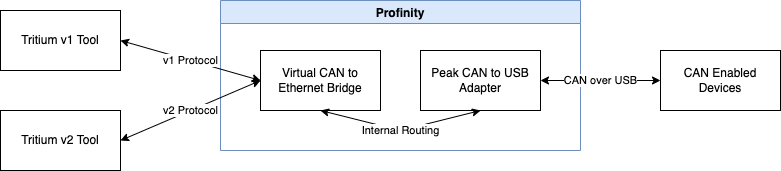
The Virtual Bridge also lets a physical V1 bridge talk to tools designed for the V2 protocol. In the scenario below, the Virtual Adapter sits in front of a Tritium V1 bridge and routes its traffic, so the bridge can communicate with tools that support the V2 protocol.

Multi-client support
The physical bridge handles a single TCP connection at a time, so a second TCP connection fails and UDP is the alternative for several clients. The Virtual Bridge handles multiple clients at once. It can therefore act as a TCP CAN bridge server, where many clients connect over TCP and keep the connection open to receive CAN data, which suits real-time CAN monitoring in remote locations.

For the physical adapters that the Virtual Adapter relays to, refer to CAN bus adapters. For the bridge that the Virtual Adapter imitates, refer to the CAN to Ethernet bridge documentation.