Tabs component
Tabs organise information into separate views that the operator switches between, where the header of each tab carries a status lamp and a caption.
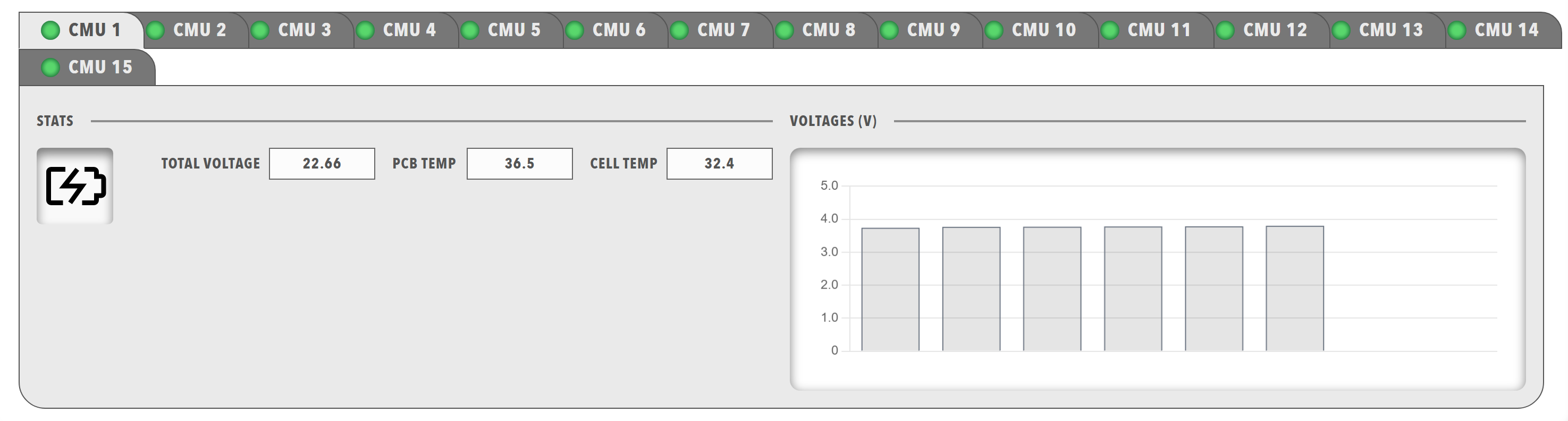
Use tabs to organise several data views, to separate different types of information and to build a multi-page interface within a single dashboard. Use an Accordion when sections should expand and collapse in place on one page.
Parameters
| Parameter | Type | Required | Default | Description |
|---|---|---|---|---|
id |
string | No | None | Not used by the web interface |
class |
string | No | None | CSS class added to the tabs element |
items |
array | Yes | None | Array of objects that each contain a single tab, which together form the tab strip. A tabs component with one tab displays the tab as the active tab without a switching control |
Tab parameters
Each item in items must contain a tab object with:
| Parameter | Type | Required | Default | Description |
|---|---|---|---|---|
id |
string | No | None | Not used by the web interface |
class |
string | No | None | Not used by the web interface |
enabled |
boolean | No | true |
When false, the tab header is displayed in the disabled style. The state can be bound with the enabled target |
visible |
boolean | No | true |
When false, the tab header is hidden. The state can be bound with the visible target, and a tab whose bound data is unavailable is hidden |
bind |
array | No | None | Data binding for the tab. The enabled and visible targets are handled |
header |
array | Yes | None | Content of the tab label in the tab strip. Each item must be an object that contains a lamp, which is displayed as the status lamp and caption of the tab. Refer to Lamp |
items |
array | Yes | None | Content shown when the tab is active. Each item must be an object that contains a panels grid |
Example
dashboard:
  items:
    - row:
        items:
          - tabs:
              items:
                - tab:
                    enabled: true
                    visible: true
                    header:
                      - lamp:
                          color: disabled
                          value: 1
                          label: INFO
                    items:
                      - panels:
                          items:
                            - panel:
                                title: Low Voltage
                                items:
                                  - readouts:
                                      items:
                                        - readout:
                                            label: 15v RAIL
                                            precision: 1
                                            bind:
                                              - target: value
                                                source: 'DBC/VoltageRail15VMeasurement/Supply15V'
                                        - readout:
                                            label: 1.9v RAIL
                                            precision: 1
                                            bind:
                                              - target: value
                                                source: 'DBC/VoltageRail3V31V9Measurement/Supply1V9'
                - tab:
                    header:
                      - lamp:
                          color: disabled
                          value: 1
                          label: TEMPERATURES
                    items:
                      - panels:
                          items:
                            - panel:
                                title: Board Temperature
                                items:
                                  - readouts:
                                      items:
                                        - readout:
                                            label: DSP TEMP
                                            unit: °C
                                            precision: 1
                                            bind:
                                              - target: value
                                                source: 'DBC/DspBoardTempMeasurement/DspBoardTemp'
Each tab in items adds one header to the tab strip, so the example above displays the tabs INFO and TEMPERATURES.