BMU dashboard
The BMU dashboard shows the data of a Prohelion Battery Management System (BMS), and appears as a tab in the sidebar once a Prohelion BMU is added to the Profile.
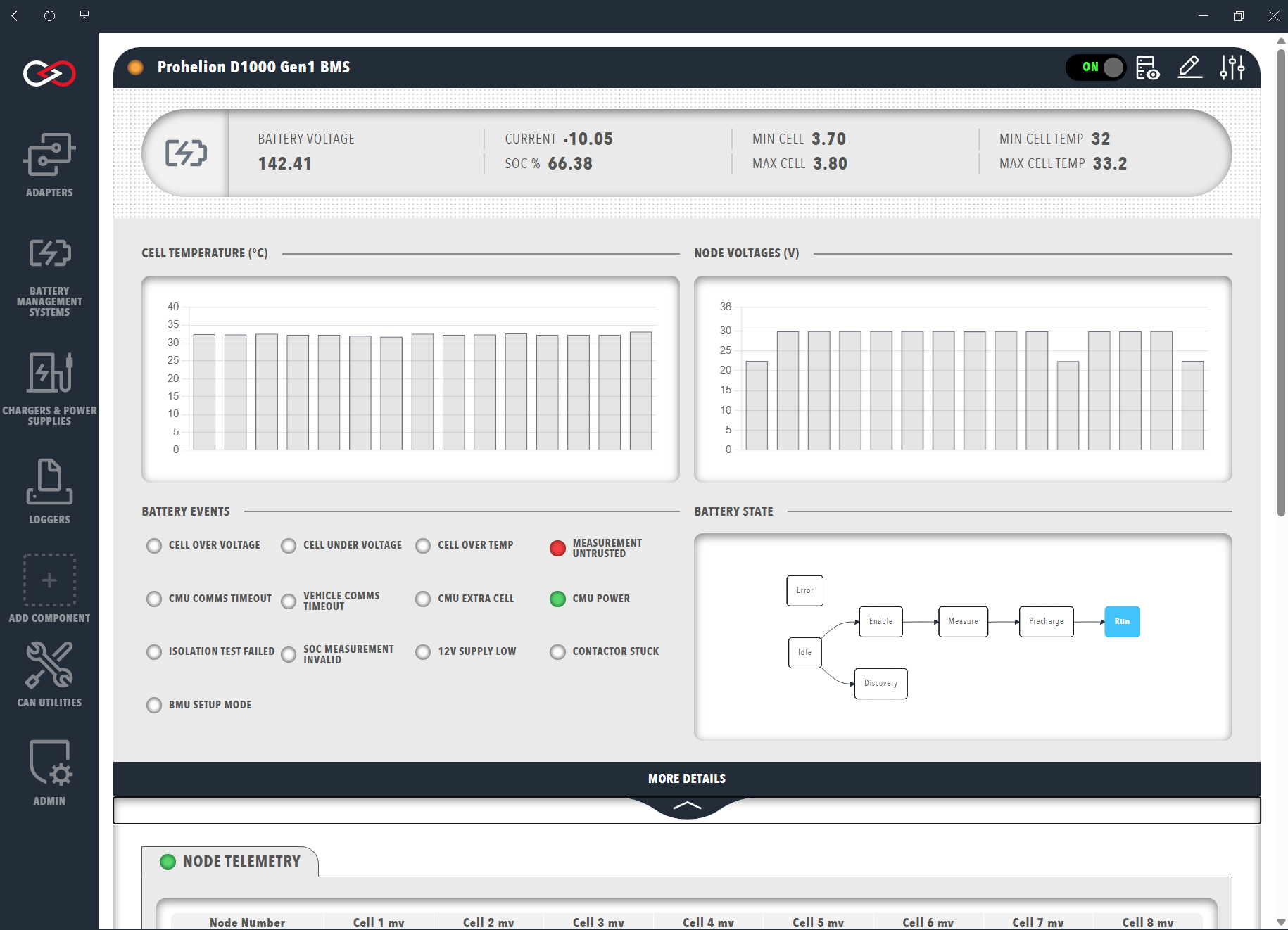
The top section of the dashboard shows data from the BMU, and clicking the MORE DETAILS banner expands it to display telemetry from the Cell Management Units (CMUs). The controls at the top-right include access to the CAN signals and messages from the BMS in the CAN database (DBC) viewer.
BMU data
The top row summarises the battery voltage, the current (negative when flowing into the battery), the state of charge (SOC) as a percentage of the user-set pack capacity (SOC %), and the maximum and minimum cell voltage and cell temperature in the pack. Below the summary are graphs of the cell temperatures and node voltages observed by the CMUs, which show the data in greater resolution when hovered over.
The lower left of the window shows status indicators for battery events. The indicators depend on the BMS in use and include cell over and under voltage, cell over temperature, untrusted measurements, CMU and vehicle timeouts, and an invalid SOC estimation.
The D1000 Gen2 dashboard instead shows the reasons reported by the BMS, including a separate PRECHARGE FAIL REASON group for a failed precharge. In that group, HVIL means the High-Voltage Interlock Loop is measuring a high impedance, which points to a connector failure, and BJU means the BJU has not responded to requests for measurements.
The right-hand side shows the progression of the BMU state machine as a flowchart, with the current state in the grey box. The states depend on the model and firmware, and the dashboard extends the D1000 Gen1 state machine with a Discovery state. The following table links the reference pages for each model.
| Model | Status flags | State machine | Configuration parameters |
|---|---|---|---|
| D1000 Gen1 | Transmitted CAN Packets | BMS State Machine | Not listed separately |
| D1000 Gen2, Firmware V1.2 | Messages and Signals (BMS Info message) | State Machine | Configuration Parameters |
| D1000 Gen2, Firmware V1.1 | Messages and Signals (BMS Info message) | State Machine | Configuration Parameters |
| M48 Gen1 | Not listed separately | Software Specifications | Software Specifications |
Node telemetry
The Node Telemetry table displays the currently connected CMUs and the voltage of each cell they monitor.
The columns depend on the BMS model.
For a D1000 Gen1 they are the CMU serial number (Node Number), the CMU board and external cell temperatures (PCB C and Cell C) and the voltage of each cell in millivolts (Cell 1 - 8 mV).
A negative voltage is a trust error, where the two redundant measurement channels disagree, and -32768 indicates a cell position that the BMU has not configured as present, as described in Transmitted CAN Packets.
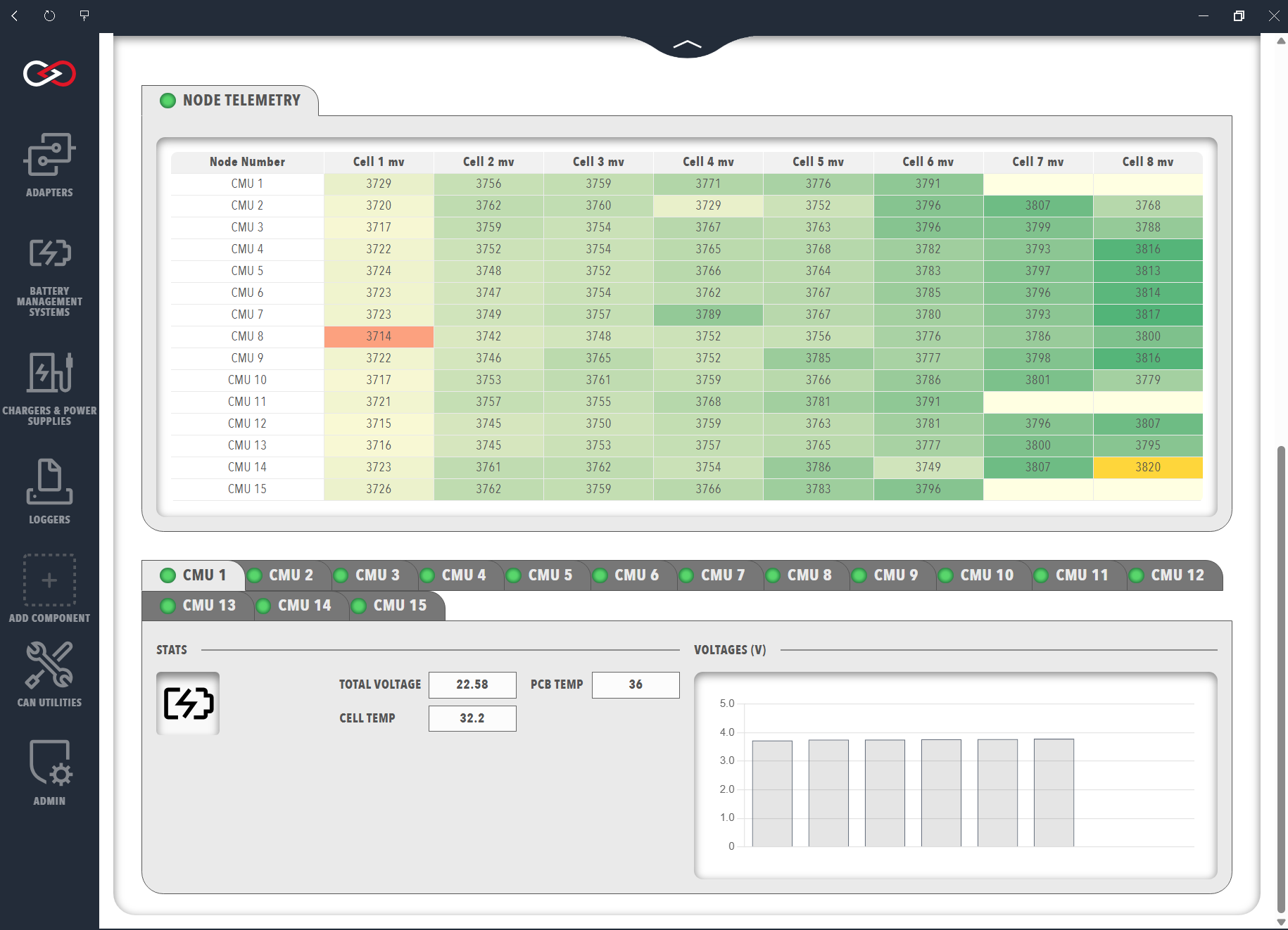
The colour of each voltage reading highlights additional information: a blue background indicates a cell that is balancing, green and orange mark the highest and lowest voltage cells, yellow indicates a trust error, and a pale-yellow background with no text indicates a cell that is not present.
To change the BMU configuration or flash its firmware, refer to Update BMU configuration and firmware.