Toggles component
A toggle is an on/off switch that runs an action each time it is clicked, while data binding shows whether the feature is currently on or off.
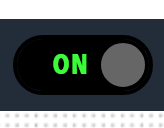
Use a toggle for feature switches, enable and disable controls, and any action that alternates between two states. Use an Action for a one-way command such as a refresh.
Parameters
| Parameter | Type | Required | Default | Description |
|---|---|---|---|---|
id |
string | No | None | Not used by the web interface |
class |
string | No | None | CSS classes added to the toggle |
label |
string | Yes | None | Two captions separated by a vertical bar, written as ON|OFF. The text before the bar is shown at the left of the switch and the text after it at the right |
action |
object | Yes | None | Action invocation that is submitted when the toggle is clicked. Refer to Toggle action invocation |
value |
object | No | None | Payload posted with the action request |
enabled |
boolean | No | true |
Whether the toggle can be clicked. The state can be bound with the enabled target |
visible |
boolean | No | true |
Not used by the web interface |
bind |
array | No | None | Data binding. The enabled, tooltip and classes targets are handled. Bind the classes target to a boolean and map true to on and false to off to show the current state of the switch, because a toggle without that binding does not show whether the feature is on or off |