Motor controller dashboard example
This page lists a complete motor controller dashboard for a Prohelion WaveSculptor22 motor controller, explains its five sections, and shows how to adapt it to another system. The dashboard monitors electrical, thermal, and performance values in real time.
Download the example dashboard
Upload dashboard.yaml on a WaveSculptor22 or WaveSculptor200 component.
Every message and signal name in the YAML is taken from the WaveSculptor22 DBC file, which the CAN protocol appendix of the WaveSculptor22 User Manual describes.
It uses rows, groups, panels, an accordion and a tab, and has no titlebar or footer, so Core Elements describes those top-level elements.
Each component used here has a smaller example of its own in the Component Reference.
Tags used
The dashboard binds to tags of a Prohelion WaveSculptor22 motor controller component.
The DBC/ tags come from the signals in the controller's DBC file, and Properties/ tags are calculated by the component, as listed in the Tag Explorer under the component.
It binds BusVoltage (V) and BusCurrent (A) from the BusMeasurement message, which the WaveSculptor broadcasts every 200 ms, the temperatures DspBoardTemp, MotorTemp and HeatsinkTemp in °C, broadcast every second, MotorVelocity in rpm and VehicleVelocity in m/s (the MPS readout), the seven limit flags and eight of the nine error flags of the Status message, which is broadcast every 200 ms (the ErrorBadMotorPositionHallSeq flag is not bound), and a set of detailed measurements.
The detailed measurements are the phase B and C currents (root mean square (RMS), in A), the 15 V, 1.9 V and 3.3 V rails, the motor voltage, motor current and back electromotive force (back-EMF) vectors, slip speed (Hz, valid for induction motors only), odometer (m), the device identifier, the serial number, and the CAN transmit and receive error counts.
Section-by-section analysis
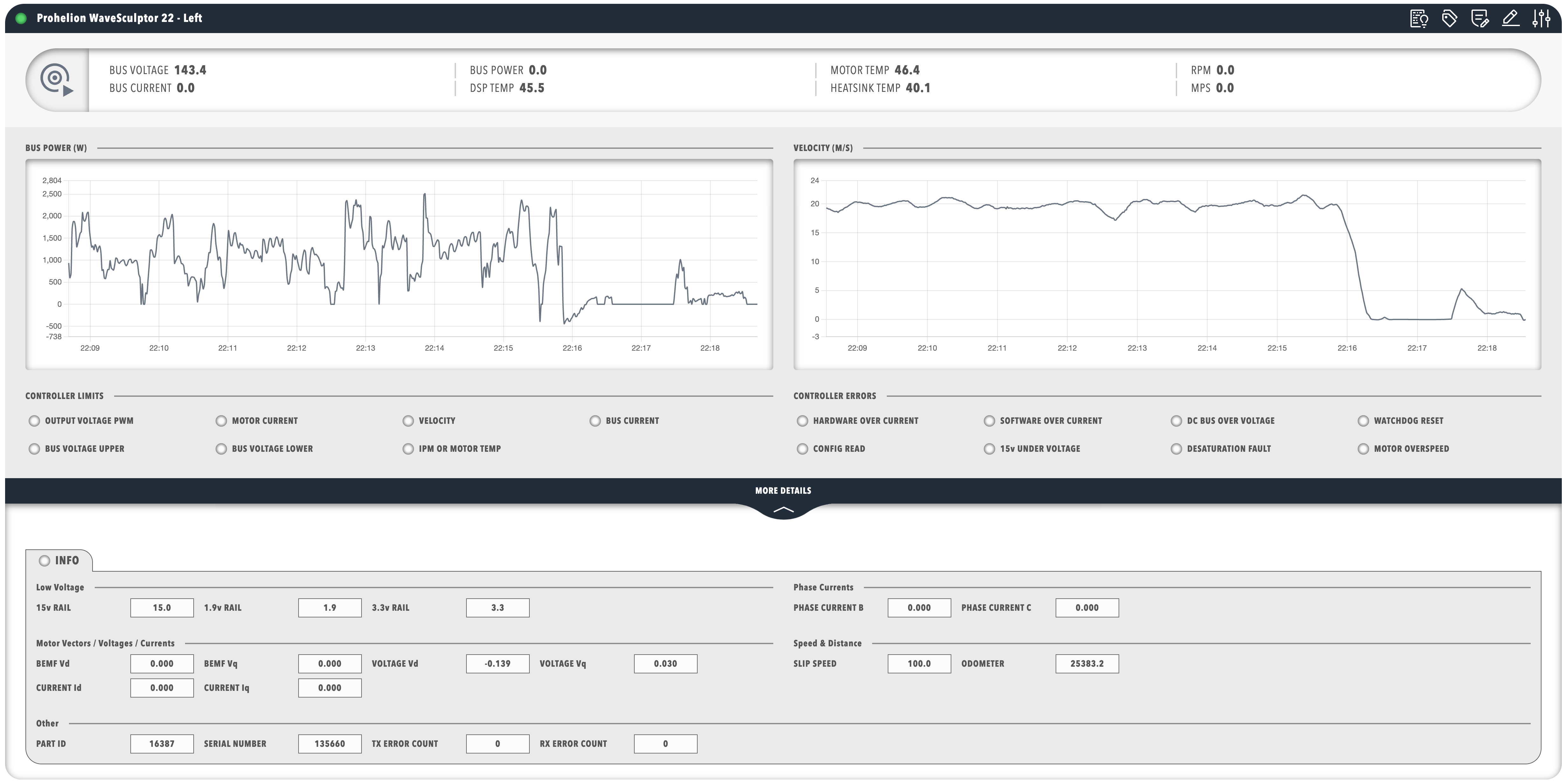
The dashboard has five sections: a status pill in the first row, four panels in the second row (two charts, the controller limits and the controller errors), and an accordion at the top level.
Status pill section
The dashboard begins with a pill that carries a motor controller icon, so the component is recognisable at a glance, and it organises bus voltage, bus current, the three temperatures and the velocities into grouped readouts.
Profinity updates the readouts from the CAN bus data, the precision of each readout is set to suit its measurement, and each binding names a tag, where the DBC/ tags correspond to CAN message signals.
Performance charts section
The second row holds two line charts, each in its own titled panel.
The bus power chart plots the Properties/BusPower tag, which the component calculates as the product of BusVoltage and BusCurrent, and which the WaveSculptor does not transmit as a signal.
The velocity chart plots the DBC/VelocityMeasurement/VehicleVelocity tag in metres per second.
Both bind with seriesMode: timeSeries to plot recent history, and both hide the legend.
Controller limits section
The controller limits panel shows the protection limits in two rows of amber lamps covering voltage, current, velocity, and temperature limits.
Each lamp binds a boolean flag of the Status message, so it lights when the limit is active and greys out when it is not.
Error monitoring section
The controller errors panel shows red lamps for the over current, over voltage, watchdog, configuration, 15 V rail, desaturation, and motor over speed errors, and does not monitor the bad motor position hall sequence error.
Each lamp lights only while its error is active.
The WATCHDOG RESET lamp is a warning more than a fault, because the controller continues to operate and the flag stays set until the next reset or power cycle.
The CONFIG READ lamp indicates that default values replaced the stored configuration values (refer to the Observation page of the configuration software manual).
Detailed information section
The last section is the MORE DETAILS accordion, which holds a tab labelled INFO with panels for low voltage, phase currents, motor vectors, speed and distance, and other data such as the identifier, serial number and CAN error counts.
Keeping the full set of measurements in an accordion leaves the main dashboard with the key metrics, and a user opens the accordion only when the detail is needed.
Complete dashboard example
The following YAML is the whole dashboard, and the sections above refer to its parts in order.
version: "2.3"
dashboard:
items:
- row:
direction: vertical
items:
- group:
class: statscontainer
items:
- pill:
icon:
image: nav_motorcontrollers_active.svg
recess: false
value: 0
items:
- pillgroup:
items:
- value:
label: BUS VOLTAGE
enabled: true
precision: 1
bind:
- target: value
source: DBC/BusMeasurement/BusVoltage
- value:
label: BUS CURRENT
enabled: true
precision: 1
bind:
- target: value
source: DBC/BusMeasurement/BusCurrent
- pillgroup:
items:
- value:
label: DSP TEMP
enabled: true
precision: 1
bind:
- target: value
source: DBC/DspBoardTempMeasurement/DspBoardTemp
- value:
label: MOTOR TEMP
enabled: true
precision: 1
bind:
- target: value
source: DBC/HeatsinkMotorTempMeasurement/MotorTemp
- value:
label: HEATSINK TEMP
enabled: true
precision: 1
bind:
- target: value
source: DBC/HeatsinkMotorTempMeasurement/HeatsinkTemp
- pillgroup:
items:
- value:
label: RPM
enabled: true
precision: 1
bind:
- target: value
source: DBC/VelocityMeasurement/MotorVelocity
- value:
label: MPS
enabled: true
precision: 1
bind:
- target: value
source: DBC/VelocityMeasurement/VehicleVelocity
- row:
direction: vertical
class: trunkpadded
items:
- panels:
items:
- panel:
title: BUS POWER (W)
items:
- chart:
type: line
legend: false
bind:
- target: value
source: Properties/BusPower
seriesMode: timeSeries
timeRangeStart: "-5m"
timeRangeStop: "0m"
- panel:
title: VELOCITY (M/S)
items:
- chart:
type: line
legend: false
bind:
- target: value
source: DBC/VelocityMeasurement/VehicleVelocity
seriesMode: timeSeries
timeRangeStart: "-5m"
timeRangeStop: "0m"
- panel:
title: CONTROLLER LIMITS
items:
- lamps:
items:
- lampgroup:
items:
- lamp:
color: amber
value: 1
label: OUTPUT VOLTAGE PWM
enabled: false
bind:
- target: enabled
source: DBC/Status/LimitOutputVoltagePWM
toType: boolean
- lamp:
color: amber
value: 1
label: MOTOR CURRENT
enabled: false
bind:
- target: enabled
source: DBC/Status/LimitMotorCurrent
toType: boolean
- lamp:
color: amber
value: 1
label: VELOCITY
enabled: false
bind:
- target: enabled
source: DBC/Status/LimitVelocity
toType: boolean
- lamp:
color: amber
value: 1
label: BUS CURRENT
enabled: false
bind:
- target: enabled
source: DBC/Status/LimitBusCurrent
toType: boolean
- lampgroup:
items:
- lamp:
color: amber
value: 1
label: BUS VOLTAGE UPPER
enabled: false
bind:
- target: enabled
source: DBC/Status/LimitBusVoltageUpper
toType: boolean
- lamp:
color: amber
value: 1
label: BUS VOLTAGE LOWER
enabled: false
bind:
- target: enabled
source: DBC/Status/LimitBusVoltageLower
toType: boolean
- lamp:
color: amber
value: 1
label: IPM OR MOTOR TEMP
enabled: false
bind:
- target: enabled
source: DBC/Status/LimitIpmOrMotorTemp
toType: boolean
- panel:
title: CONTROLLER ERRORS
items:
- lamps:
items:
- lampgroup:
items:
- lamp:
color: red
value: 1
label: HARDWARE OVER CURRENT
enabled: false
bind:
- target: enabled
source: DBC/Status/ErrorHardwareOverCurrent
toType: boolean
- lamp:
color: red
value: 1
label: SOFTWARE OVER CURRENT
enabled: false
bind:
- target: enabled
source: DBC/Status/ErrorSoftwareOverCurrent
toType: boolean
- lamp:
color: red
value: 1
label: DC BUS OVER VOLTAGE
enabled: false
bind:
- target: enabled
source: DBC/Status/ErrorDcBusOverVoltage
toType: boolean
- lamp:
color: red
value: 1
label: WATCHDOG RESET
enabled: false
bind:
- target: enabled
source: DBC/Status/ErrorWatchdogCausedLastReset
toType: boolean
- lampgroup:
items:
- lamp:
color: red
value: 1
label: CONFIG READ
enabled: false
bind:
- target: enabled
source: DBC/Status/ErrorConfigRead
toType: boolean
- lamp:
color: red
value: 1
label: 15v UNDER VOLTAGE
enabled: false
bind:
- target: enabled
source: DBC/Status/Error15vRailUnderVoltage
toType: boolean
- lamp:
color: red
value: 1
label: DESATURATION FAULT
enabled: false
bind:
- target: enabled
source: DBC/Status/ErrorDesaturationFault
toType: boolean
- lamp:
color: red
value: 1
label: MOTOR OVERSPEED
enabled: false
bind:
- target: enabled
source: DBC/Status/ErrorMotorOverSpeed
toType: boolean
- accordion:
label: MORE DETAILS
items:
- row:
direction: vertical
items:
- tabs:
items:
- tab:
enabled: true
header:
- lamp:
color: disabled
value: 1
label: INFO
items:
- panels:
items:
- panel:
title: Low Voltage
items:
- readouts:
items:
- readout:
label: 15v RAIL
precision: 1
bind:
- target: value
source: DBC/VoltageRail15VMeasurement/Supply15V
- readout:
label: 1.9v RAIL
precision: 1
bind:
- target: value
source: DBC/VoltageRail3V31V9Measurement/Supply1V9
- readout:
label: 3.3v RAIL
precision: 1
bind:
- target: value
source: DBC/VoltageRail3V31V9Measurement/Supply3V3
- panel:
title: Phase Currents
items:
- readouts:
items:
- readout:
label: PHASE CURRENT B
precision: 3
bind:
- target: value
source: DBC/PhaseCurrentMeasurement/PhaseCurrentB
- readout:
label: PHASE CURRENT C
precision: 3
bind:
- target: value
source: DBC/PhaseCurrentMeasurement/PhaseCurrentC
- panel:
title: Motor Vectors
items:
- readouts:
items:
- readout:
label: BEMF Vd
precision: 3
bind:
- target: value
source: DBC/BackEMFMeasurementPrediction/BEMFd
- readout:
label: BEMF Vq
precision: 3
bind:
- target: value
source: DBC/BackEMFMeasurementPrediction/BEMFq
- readout:
label: MOTOR VOLTAGE Vd
precision: 3
bind:
- target: value
source: DBC/MotorVoltageVectorMeasurement/Vd
- readout:
label: MOTOR VOLTAGE Vq
precision: 3
bind:
- target: value
source: DBC/MotorVoltageVectorMeasurement/Vq
- readout:
label: MOTOR CURRENT Id
precision: 3
bind:
- target: value
source: DBC/MotorCurrentVectorMeasurement/Id
- readout:
label: MOTOR CURRENT Iq
precision: 3
bind:
- target: value
source: DBC/MotorCurrentVectorMeasurement/Iq
- panel:
title: Speed & Distance
items:
- readouts:
items:
- readout:
label: SLIP SPEED
precision: 1
bind:
- target: value
source: DBC/SlipSpeedMeasurement/SlipSpeed
- readout:
label: ODOMETER
precision: 1
bind:
- target: value
source: DBC/OdometerBusAhMeasurement/Odometer
- panel:
title: Other
items:
- readouts:
items:
- readout:
label: PART ID
bind:
- target: value
source: DBC/IDInfo/TritiumID
- readout:
label: SERIAL NUMBER
bind:
- target: value
source: DBC/IDInfo/SerialNumber
- readout:
label: TX ERROR COUNT
bind:
- target: value
source: DBC/Status/TxErrorCount
- readout:
label: RX ERROR COUNT
bind:
- target: value
source: DBC/Status/RxErrorCount
Adapting the dashboard
The bindings in this dashboard follow three patterns that Data Binding describes in full: a readout bound to a DBC/ tag for the latest value, a chart bound with seriesMode: timeSeries with a timeRangeStart and timeRangeStop window for recent history, and a lamp bound to enabled with toType: boolean for a status flag.
The DBC/ paths are relative to the component that owns the dashboard, so the dashboard works for any component that publishes the same tags, such as a second WaveSculptor22 controller.
The Properties/ tags depend on the component, and the Tag Explorer lists them under it (refer to Tags).
To adapt the dashboard to another controller, replace each source with the path of the matching tag, which you can copy from the Tag Explorer, and adjust the measurements, layout, precision and labels to suit.
The WaveSculptor200 sends the same CAN messages and signals as the WaveSculptor22, so the tags in this dashboard apply to both controllers.
To add sections, copy a panel and bind it to other tags for more charts, add lamps for further limit or error flags, add readouts for system-specific parameters, or add actions and toggles for control. The Visual Editor is the quickest way to make these changes.