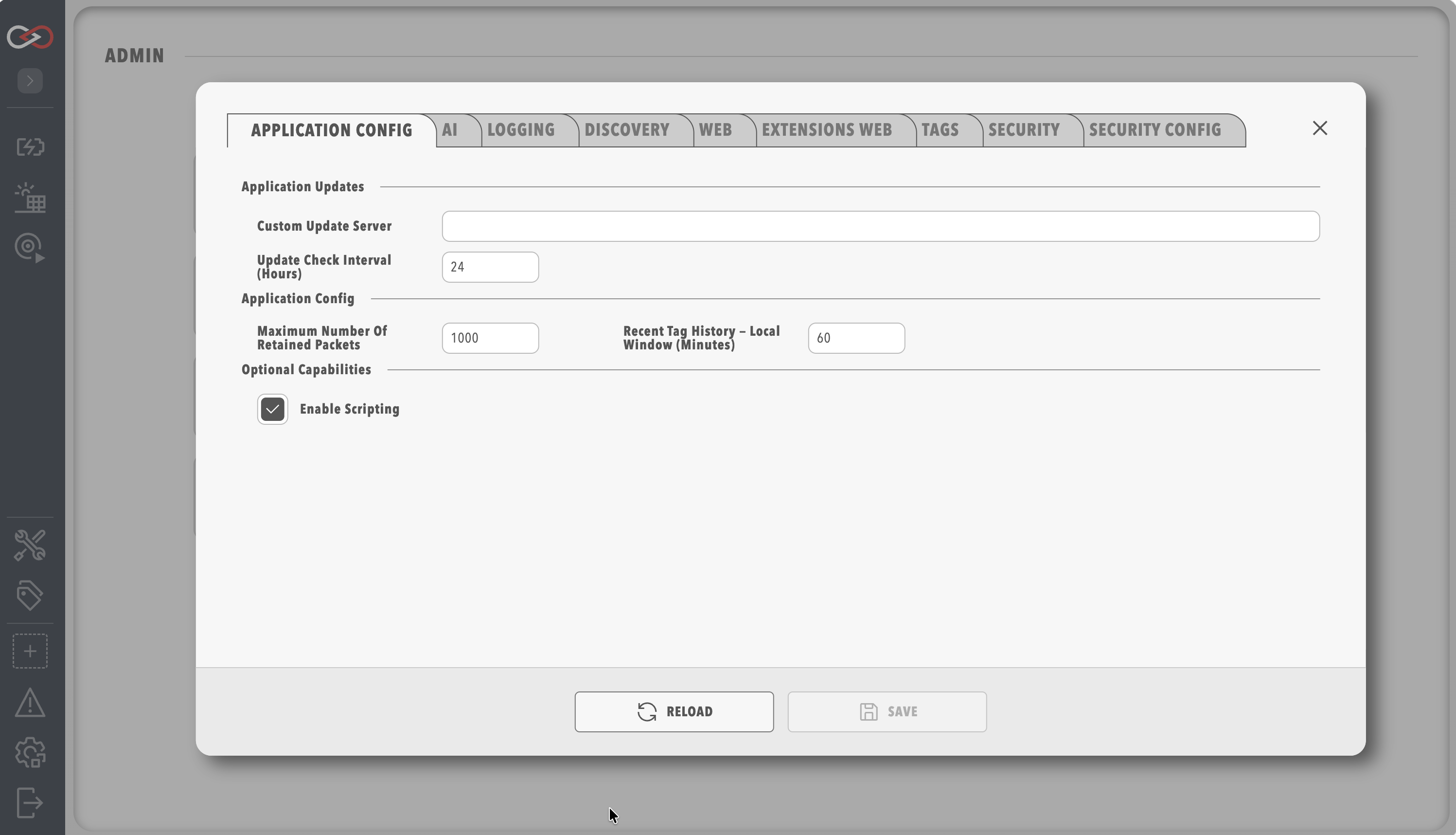
Application Config
The Application Config tab of System Configuration holds packet retention, update checks, the recent tag history window and scripting.
Saving changes on any System Configuration tab restarts Profinity. Refer to System Configuration for what to expect.
| Parameter | Description |
|---|---|
Maximum number of retained Packets |
Profinity retains CAN Packets for use in the CAN Utilities, and this parameter sets the number of packets retained. The default is 1000 and the range is 1 to 10000. |
Custom Update Server |
The address of your own update server. Leave it blank to use the standard Prohelion update service. |
Update Check Interval (hours) |
How often Profinity checks for updates, from 1 to 168 hours (one week). The default is 24, and 0 disables scheduled checks. |
Recent tag history — local window (minutes) |
Dashboard bindings that query a time range starting within this window are served entirely from the in-memory tag buffer. Ranges that start earlier use the designated InfluxDB reader for the whole window, when one is configured. The default is 60 and the range is 1 to 10080 minutes. |
Enable Scripting |
Scripting is off by default and must be selected for the instance to run scripts, which is a security decision because scripts run code on the host. The field is available only when the licence includes the Scripting feature (Desktop, Server, and Enterprise). An unlicensed instance does not include scripting. |