WaveSculptor dashboard
The WaveSculptor dashboard decodes the CAN messages of a WaveSculptor and appears as a tab in the sidebar once the controller is added to the Profile.
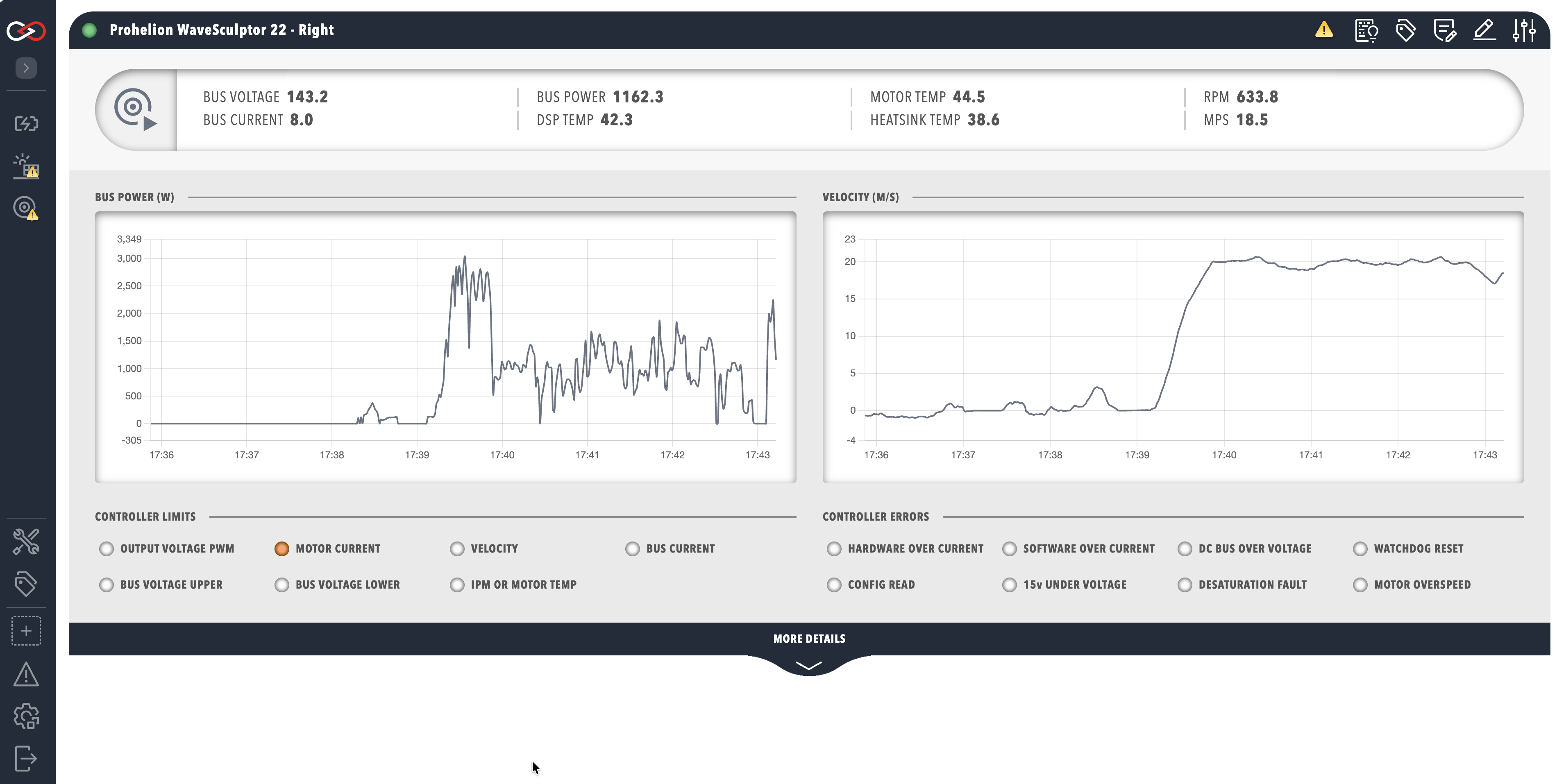
WaveSculptor data
The top row of the dashboard summarises the bus voltage, bus current, bus power, digital signal processor (DSP), motor and heatsink temperatures, motor speed in RPM and vehicle speed in MPS (metres per second). A negative bus current or bus power indicates power flowing out of the WaveSculptor, for example during regenerative braking. Profinity calculates BUS POWER as the product of bus voltage and bus current. MOTOR TEMP reads correctly only when a motor temperature sensor is connected and configured, and MPS depends on the tyre diameter entered in the WaveSculptor configuration.
Below the summary are time-series graphs of bus power and velocity, followed by a CONTROLLER LIMITS panel (amber) and a CONTROLLER ERRORS panel (red). An indicator lights when the matching bit of the Status message is set. Only one control loop limits the motor torque at any one time, so a single limit indicator is lit, and MOTOR CURRENT or VELOCITY lighting means the setpoint has been reached during normal operation.
| Limit indicator | Meaning |
|---|---|
| OUTPUT VOLTAGE PWM | There is not enough bus voltage to produce more current and more torque. |
| MOTOR CURRENT | The motor current setpoint is being regulated. |
| VELOCITY | The velocity setpoint has been reached. |
| BUS CURRENT | The bus current setpoint is limiting any further increase in motor torque. |
| BUS VOLTAGE UPPER | Regenerative torque is limited by the maximum bus voltage setpoint. |
| BUS VOLTAGE LOWER | Drive torque is limited by the minimum bus voltage setpoint. |
| IPM OR MOTOR TEMP | A temperature limit is reducing the motor torque. IPM is the intelligent power module. |
| Error indicator | Meaning |
|---|---|
| HARDWARE OVER CURRENT | The hardware over current comparator tripped, even if only for an instant. |
| SOFTWARE OVER CURRENT | The measured current exceeded the limit in the calibration configuration. |
| DC BUS OVER VOLTAGE | The bus voltage exceeded the over voltage limit in the calibration configuration. |
| WATCHDOG RESET | The watchdog reset the controller. This is a warning rather than a fault and stays set until the next power cycle. |
| CONFIG READ | The stored configuration could not be read at start-up, so default values are in use. |
| 15v UNDER VOLTAGE | The internal 15 V rail has dropped too low. |
| DESATURATION FAULT | On the WaveSculptor22 this indicates an under voltage of the metal-oxide-semiconductor field-effect transistor (MOSFET) driver. |
| MOTOR OVERSPEED | The motor speed exceeded the configured maximum by 15%. |
Each limit and error is described in more detail on the Observation page of the configuration software manual. The MORE DETAILS banner reveals the internal controller state, which is useful for debugging and not needed for general use. The state includes the low-voltage rails, phase currents, direct-quadrature (D-Q) reference frame vectors, slip speed, odometer, serial number and CAN error counts. Signals that the default dashboard does not display, such as the motor hall sequence error, can be bound to a lamp in a custom dashboard.