Tables component
A table presents structured data in rows and columns, with heatmaps, highlighting, and threshold alerts that help analyse the data.
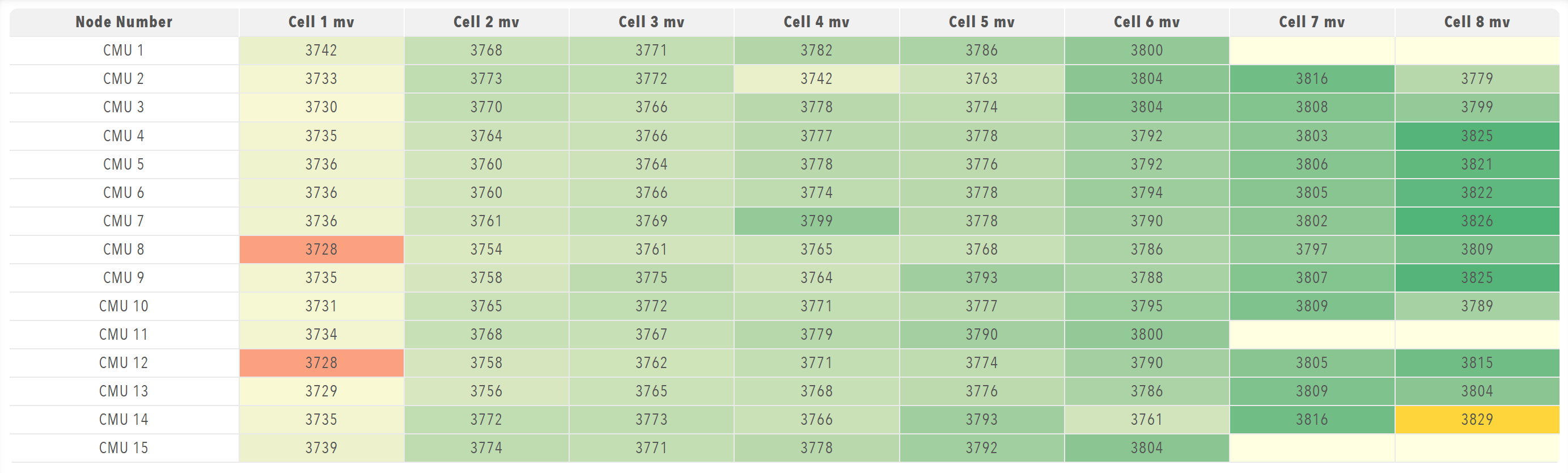
Use a table for structured and multi-dimensional data, large sets of values and comparisons between values. Use Readouts for a few individual values, and a Chart when the shape of the data matters more than the exact values.
Parameters
| Parameter | Type | Required | Default | Description |
|---|---|---|---|---|
id |
string | No | None | Not used by the web interface |
class |
string | No | None | Not used by the web interface |
label |
string | No | None | Not used by the web interface |
tableHeaders |
array | Yes | None | Column definitions for tables whose data is an array of row objects. The headers are not used when the bound data is a time series |
value |
array | No | None | Not used for display. The value only marks the table as stale until data arrives, and the rows come from bind at run time |
selectColumns |
boolean | No | false |
Lets the operator show and hide individual columns |
minValueToDisplay |
number | No | None | Numeric cells below this value are displayed empty |
maxValueToDisplay |
number | No | None | Numeric cells above this value are displayed empty |
heatmap |
boolean | No | false |
Colours cells on a scale from pale yellow to green between the lowest and highest values in the table |
highlightMin |
boolean | No | false |
Highlights the lowest value or values in the table |
highlightMax |
boolean | No | false |
Highlights the highest value or values in the table |
highlightAtOrBelow |
number | No | None | Highlights cells at or below this value |
highlightAtOrAbove |
number | No | None | Highlights cells at or above this value |
highlightIfEqualTo |
number | No | None | Highlights cells that equal this value exactly. An exact match takes priority over the range settings |
alertAtOrBelow |
number | No | None | Colours cells at or below this value as an alert |
alertAtOrAbove |
number | No | None | Colours cells at or above this value as an alert |
alertIfEqualTo |
number | No | None | Colours cells that equal this value as an alert. An exact match takes priority over the range settings |
displayPositive |
boolean | No | false |
Shows the absolute value of negative numbers |
conversionFactor |
number | No | None | Factor that multiplies each displayed number, for example for a unit conversion |
precision |
number | No | None | Number of decimal places for numeric cells |
rowNames |
array of string | No | None | Custom name for each row when the bound data is a time series. A row without a name uses the label of its series |
columnNames |
array of string | No | None | Custom heading for each value column when the bound data is a time series. A column without a name is numbered from 1 |
enabled |
boolean | No | true |
Not used by the web interface |
visible |
boolean | No | true |
Not used by the web interface |
bind |
array | No | None | Data binding that supplies the table data from tags, either as an array of row objects or as a series. Use the value target |
The web interface applies the settings to each numeric cell in this order:
- The display range (
minValueToDisplayandmaxValueToDisplay) is tested against the original value, and a cell outside the range is displayed empty. conversionFactor,displayPositiveandprecisionare applied to the displayed text.
The highlight, alert, and heatmap colours are chosen from the original value.
Table header parameters
Each item in tableHeaders must contain a header object with:
| Parameter | Type | Required | Default | Description |
|---|---|---|---|---|
accessorKey |
string | Yes | None | Field path in each row object that supplies the cells of the column |
value |
string | Yes | None | Text of the column header |
Example
The example follows the cell voltage table of the Prohelion BMU dashboard, in which each cell value is in millivolts and the value -32768 marks a cell position that is not present, so minValueToDisplay: 0 leaves those cells empty:
dashboard:
  items:
    - row:
        items:
          - table:
              tableHeaders:
                - header:
                    accessorKey: name
                    value: Node Number
                - header:
                    accessorKey: cell1mV
                    value: Cell 1 mV
                - header:
                    accessorKey: cell2mV
                    value: Cell 2 mV
              minValueToDisplay: 0
              heatmap: true
              highlightMin: true
              highlightMax: true
              displayPositive: true
              bind:
                - target: value
                  source: /Prohelion BMU/Properties/PackData/Nodes/Values
The same table can flag low cells instead of only the lowest and highest. Here highlightAtOrBelow highlights cells at or below 2500 mV, alertAtOrBelow colours cells at or below 2000 mV as an alert, and precision: 0 shows whole millivolts:
dashboard:
  items:
    - row:
        items:
          - table:
              tableHeaders:
                - header:
                    accessorKey: name
                    value: Node Number
                - header:
                    accessorKey: cell1mV
                    value: Cell 1 mV
                - header:
                    accessorKey: cell2mV
                    value: Cell 2 mV
              minValueToDisplay: 0
              heatmap: true
              highlightAtOrBelow: 2500
              alertAtOrBelow: 2000
              precision: 0
              bind:
                - target: value
                  source: /Prohelion BMU/Properties/PackData/Nodes/Values