Tag layer
The tag layer is Profinity's catalogue of live and configured tag values. It is the foundation for TAG EXPLORER, collections, rules, and alerts, which are new in Profinity 2.3.
Open TAG EXPLORER from TAG UTILITIES in the side menu to browse the tag tree, switch to table views where available, and inspect the data quality indicator on each tag. This needs the View tags permission. Stale quality has its own icon, separate from the rule alert triangle. The TAG UTILITIES group in the side menu also appears for users with the View tags permission.
The collections and derived tags editors need a loaded profile. Saving needs Modify tag collections for collections and derived tags, and Modify tag rules for rules.
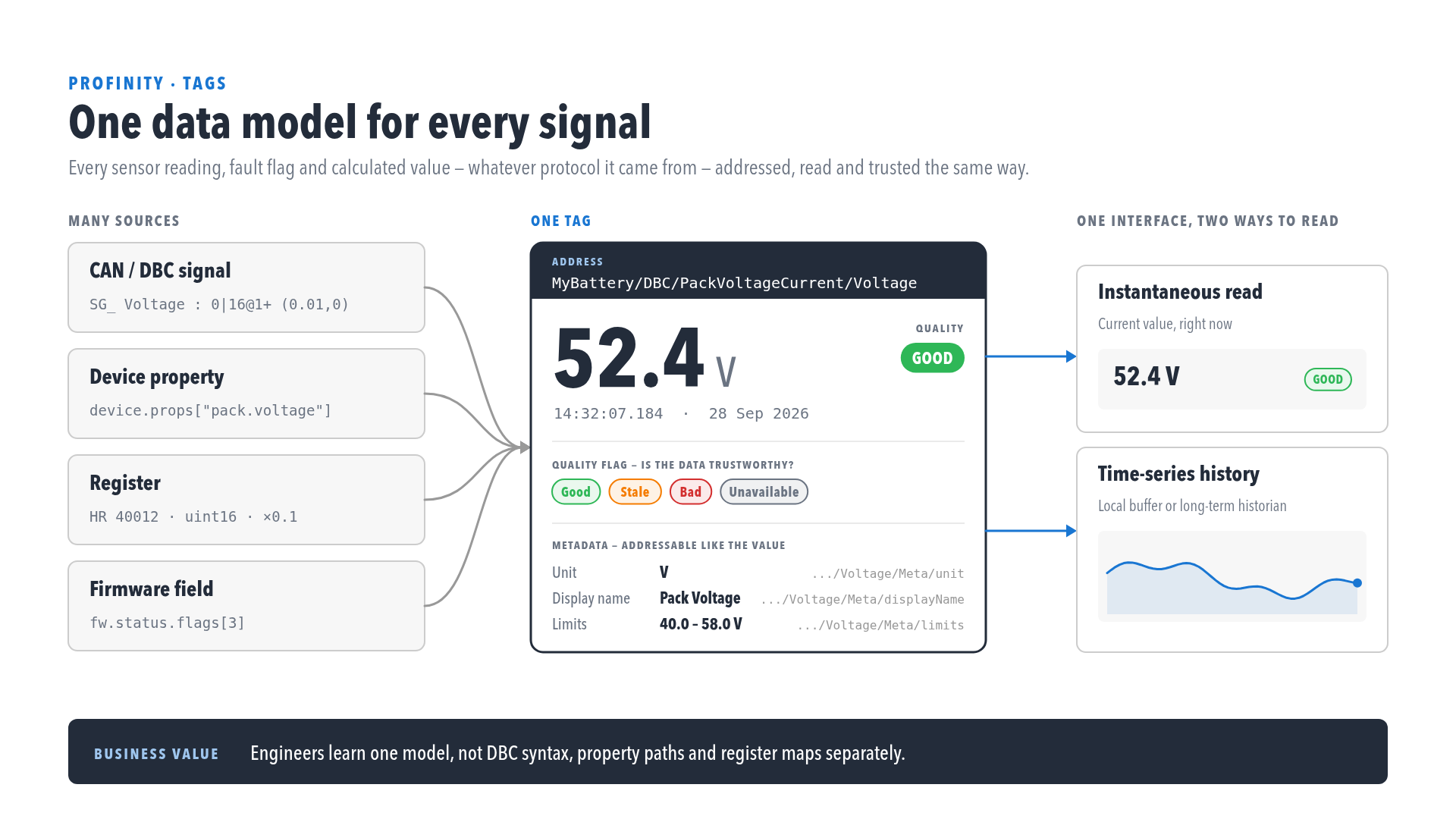
To start a collection, a rule, or a dashboard binding from tags selected in TAG EXPLORER, refer to Create collections, rules, and dashboard bindings from tags.
Each page in these groups covers one job.
Select, group, and derive tags
- Selecting tags: how a tag's path in the tree and the expression language work together to pick tags.
- Tag tree paths and dashboard binds: how nesting a component in a folder of the tag tree affects scopes and binds.
- Nest a component in the tag tree: mount a component inside a folder of the tag tree.
- Tag expressions: the expression language shared by collections, rules, and derived tags.
- Tag collections: group tags with a membership expression. Open COLLECTIONS under TAG UTILITIES to open an editor window, which requires View tag collections.
- Create a collection: build a restricted collection of cell voltages in the collections editor.
- Derived tags: compute a tag from other tags. Open DERIVED TAGS under TAG UTILITIES to open an editor window, which requires View tag collections.
- Create a derived tag: convert speed from mph to km/h with an expression.
- Create a derived tag with a script: publish a derived tag from a script.
Rules and alerts
- Tag rules: evaluate tags and raise alerts. Open RULES & ACTIONS under TAG UTILITIES to open an editor window, which requires View tag rules.
- Create a rule: raise an alert when the maximum cell temperature of a battery goes above a limit.
- Rule settings: look up how a rule is evaluated, published, and permitted.
- Complete rules.yaml example: read a full rules file with its main settings explained.
- Rule actions: choose what a rule does when it fires.
- Email and Slack rule actions: settings for the Email and Slack notification actions.
- Webhook and MQTT rule actions: settings for the Webhook and Message Queuing Telemetry Transport (MQTT) notification actions.
- Alerts Log: review, acknowledge, and silence alerts. Open ALL ALERTS in the side menu, which requires View alerts.
Logs and relay
- Tag logs: record tag values to a file and replay them onto live tags.
- Log tags to a file: record tag values to a file with the TAG File Logger.
- Replay a tag log: play a recording back onto your live tags from TAG LOG REPLAY under TAG UTILITIES, which requires Replay tag changes.
- Tag relay: share live tags between Profinity instances. One instance publishes periodic snapshots of selected collections, and another ingests them as read-only tags under that site's own prefix.
Integrations can work with tags, tag collections, tag rules, and alerts through the Representational State Transfer (REST) API under /api/v2.
The Swagger page, the interactive API page on your Profinity instance, lists every endpoint and the parameters it accepts.
The older data endpoint under /api/v2/Data is removed.
For new integrations, use GET /api/v2/Tags for values, POST /api/v2/TagQuerySet to query tags, and /api/v2/Tags/History for history.
All endpoints require the appropriate permissions, which are listed in Roles and permissions.