Tag rules
A tag rule watches a set of tags and raises an alert in the Alerts Log when its condition is met. A rule can also run actions when it raises an alert, such as sending an email or a Slack message, calling a webhook, publishing a Message Queuing Telemetry Transport (MQTT) message, or running a script. To write your first rule, follow Create a rule.
Rule actions need a licence
Rules and the Alerts Log work on every edition. The Email, Slack, Webhook, and MQTT actions need the Tag Rule Actions licensed feature.
A script that runs on alert needs Tag Rule Actions and Scripting. Refer to Licensing for what each edition includes.
How a rule works
A rule has a scope that says which tags it watches, a condition, an alert level, and optional actions. Rules evaluate whenever a tag in their scope changes.
A rule set is all the rules in one rules file, either the profile's rules file or a component's own rules file, and each rule set has its own on and off switch.
A scope is a tag path prefix, a tag collection, or both.
A rule needs a prefix, a collection, or both after its scope inherits from its file, group, and component. Use the prefix / to cover the whole tag catalogue.
A scope can be set for the whole file, for a group, and for a single rule, and each level inherits the scope of the level above unless it sets its own.
A relative tag path prefix joins beneath the prefix of the level above, and a prefix that starts with / replaces it.
Actions set for the file or a group are inherited by every rule beneath it, and a rule can switch an inherited action off.
An action runs when the rule's alert level reaches the action's trigger level. A rule runs only when the file, its group, and the rule itself are all enabled.
A threshold rule holds ordered steps, and one evaluation can cross more than one of them. Profinity then runs an action for each step it enters or leaves, in order, and hands each one to a rule script without waiting for the script to finish. Set Trigger overlap to Queue on that script when the action for the step the value lands on must still run.
Drop, the default, discards an action that arrives while the script is still running, and that action is not tried again. The setting is described under Trigger overlap.
The condition is written in the tag expression language.
For example, tag.Value > 4.2 trips the rule (raises the alert) and tag.Value < 4.0 clears it, while tag.IsStale catches a sensor that has stopped reporting.
A tag.IsStale rule fires for a tag that has stopped changing only when an evaluation tick is set, as described under Evaluation tick.
The valid alert levels, their aliases and the default are described under Alert levels.
Each rule also has a description that the Alerts Log shows to the user.
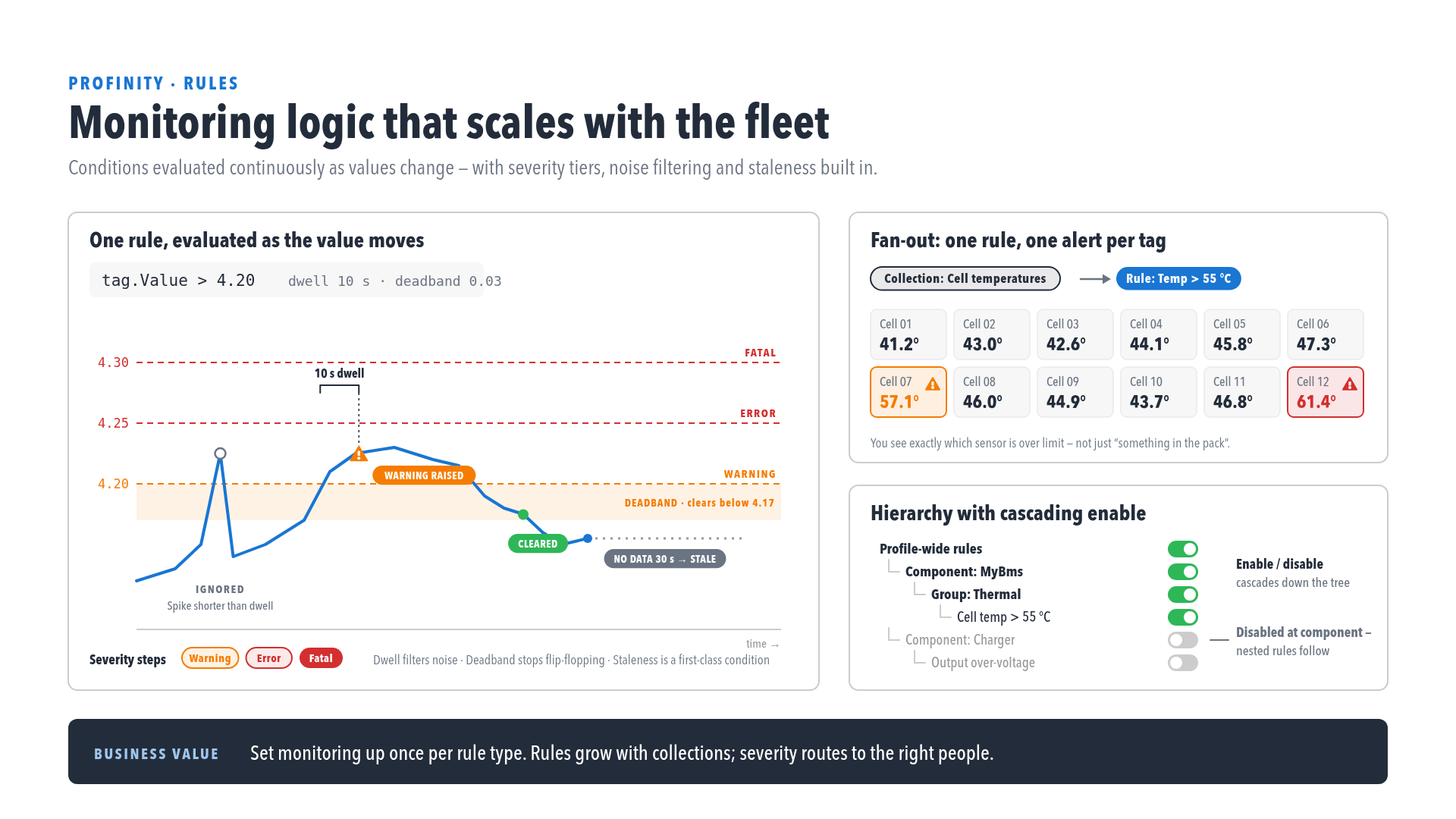
Two settings stop an alert flickering on and off. Dwell holds the alert back until the condition has lasted a set time, and deadband clears the alert at a different point from where it tripped. A rule can also send again when its value changes while the alert stays true, name related tags for the expression and the message, and mirror its current state to a read-only tag. Rule settings describes those settings, the evaluation tick, and rule state publishing.
Rules visual editor
Select RULES & ACTIONS under TAG UTILITIES in the side menu, which needs the View tag rules permission. Alternatively, choose Edit Rules on a component that ships default rules, such as the Elmar Solar MPPT (Maximum Power Point Tracker) and the C48 Gen2. The editor lists the profile's rules first and then each component's rules. It shows every rule with its level, scope, thresholds, and actions.
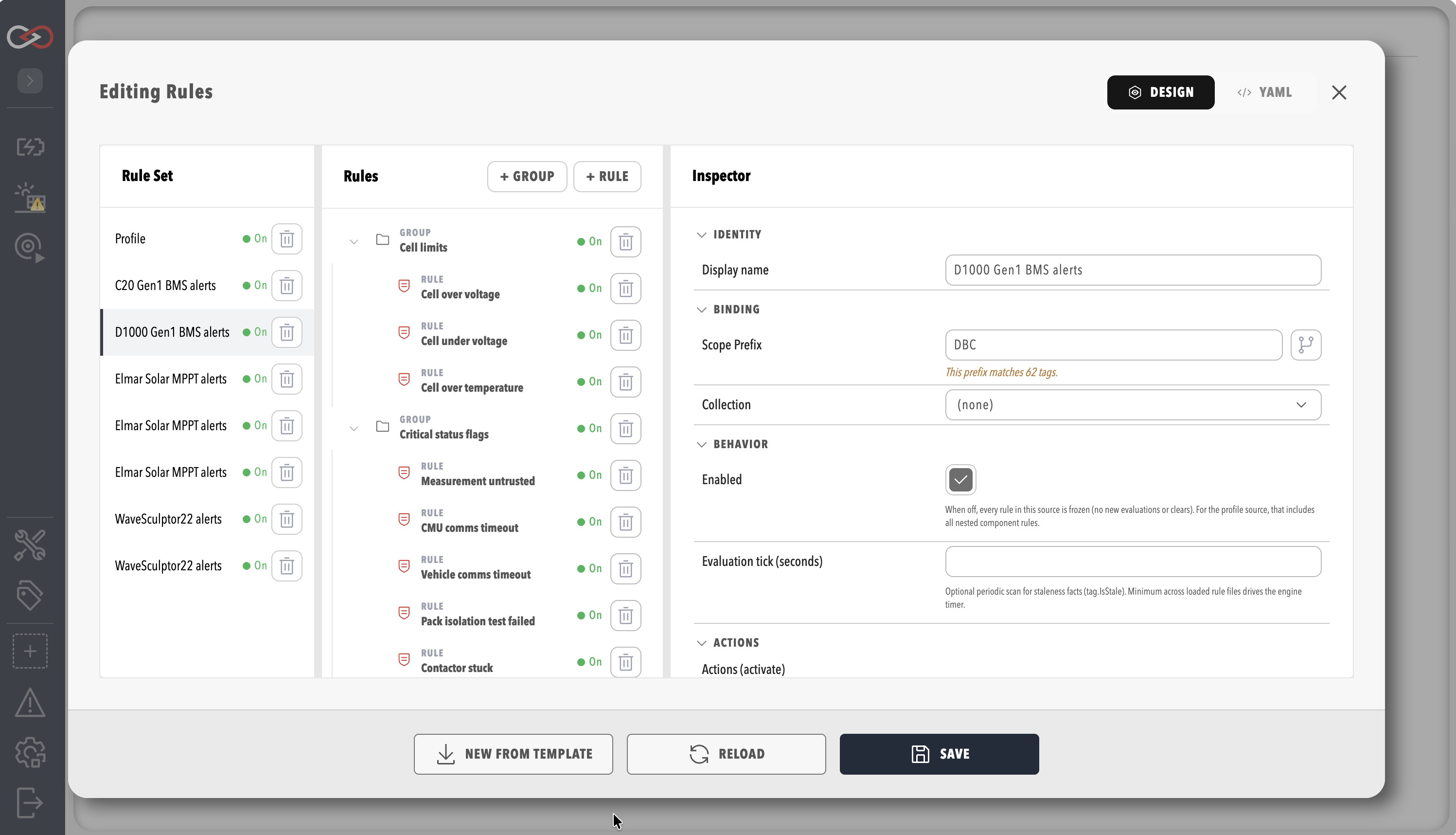
The editor writes the same rules.yaml document that can be edited directly.
Where to go next
- Create a rule: build a rule in the editor, step by step.
- Rule settings: look up the evaluation settings and the permissions rules need.
- Complete rules.yaml example: read a full
rules.yamlthat uses most of the settings. - Rule actions: set up the email, Slack, webhook, MQTT, and script actions a rule can run.
For the rest of the tag layer, refer to Tag expressions, Collections, Derived tags and Tag layer.