Historians
A historian is a logging component that writes the history of your tags to a database. Unlike a logger, it also allows that history to be read back through the APIs.
Dashboards, trend charts and integrations that ask for long-range tag history are answered from the historian, so a profile that needs more than the recent in-memory values needs one. Each historian selects the tags it records through collections, and requires the Historians licensed feature, included in the Desktop, Server and Enterprise editions. Licensing shows whether it is available on your instance.
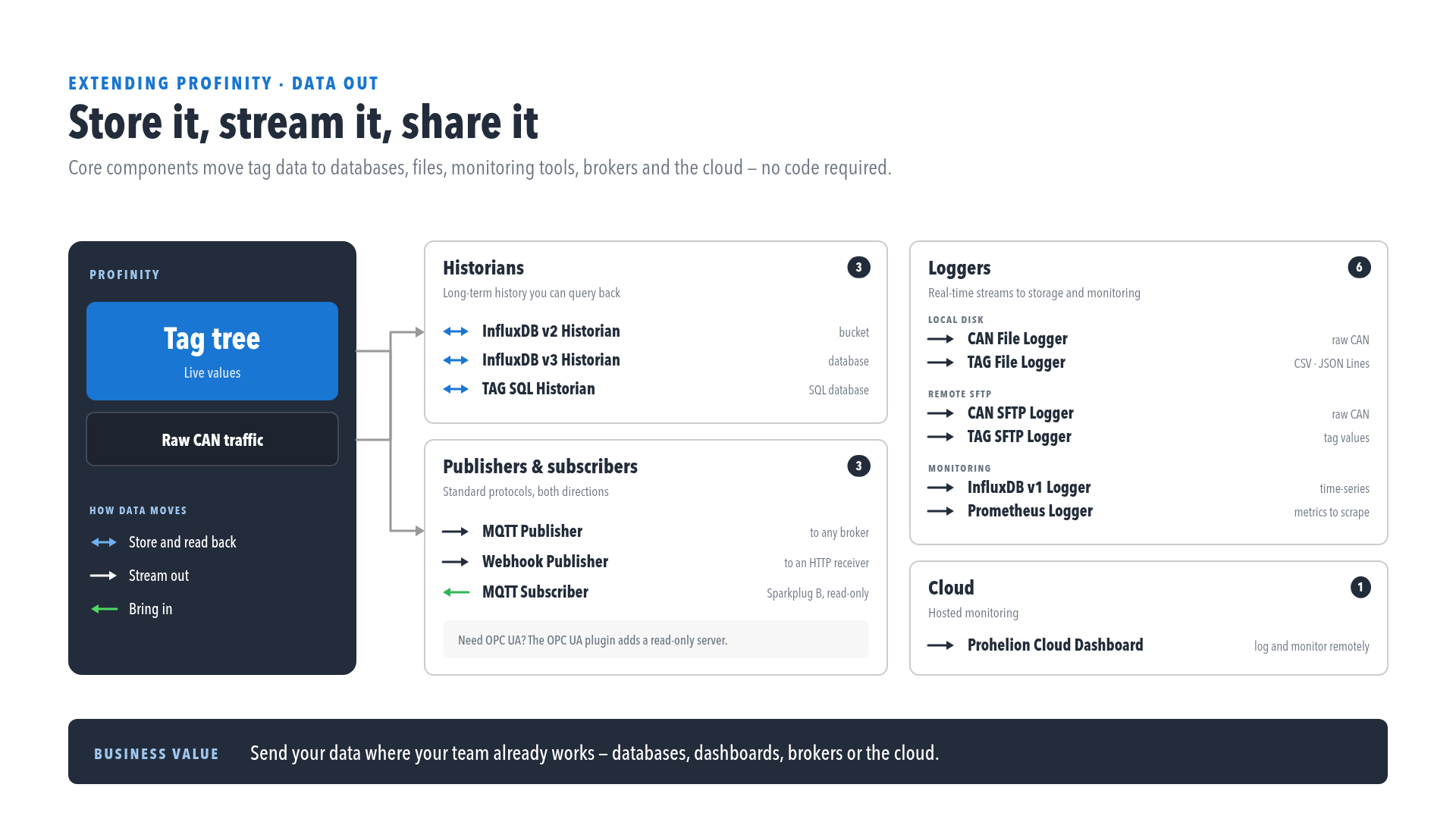
- TAG Local Historian: store history in a managed SQLite file on the Profinity host, with no connection string.
- InfluxDB historians: store history in an InfluxDB v2 server (bucket and organisation) or an InfluxDB v3 server (database), and choose the one that matches your server version.
- TAG SQL Historian: store history in a SQLite, SQL Server / Azure SQL, PostgreSQL, MySQL, or Oracle table that you configure with a connection string.
- Designated historian: choose which historian answers long-range history queries.
The InfluxDB historians store only tags that hold a number. To keep the history of tags that hold text, such as the findings of an AI Technician, use the TAG Local Historian or the TAG SQL Historian.