Tag collections
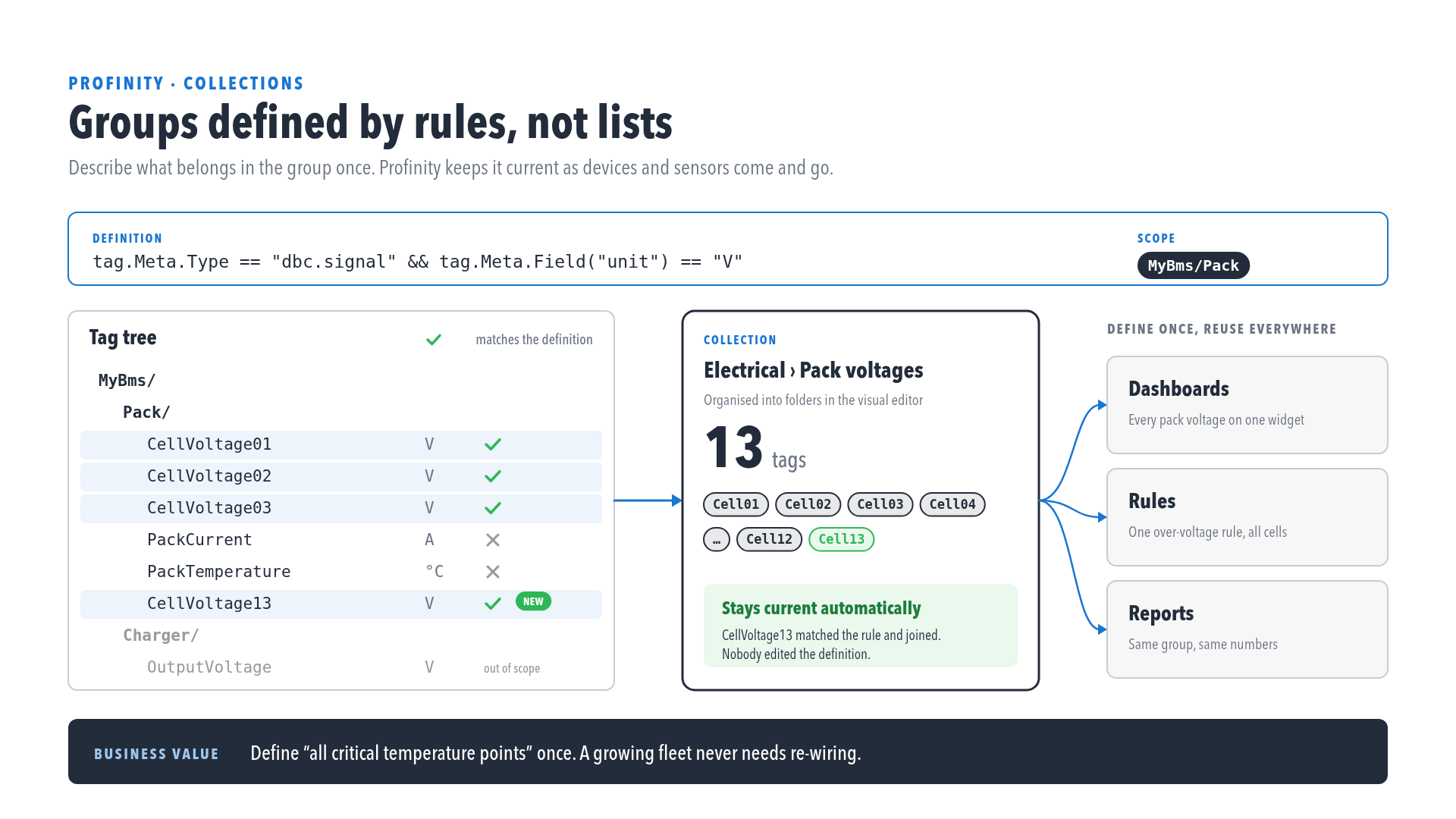
Collections group tags for filtering, dashboards, and rules. You build and manage them in the visual editor, and Create a collection walks through an example.
Open the collections editor
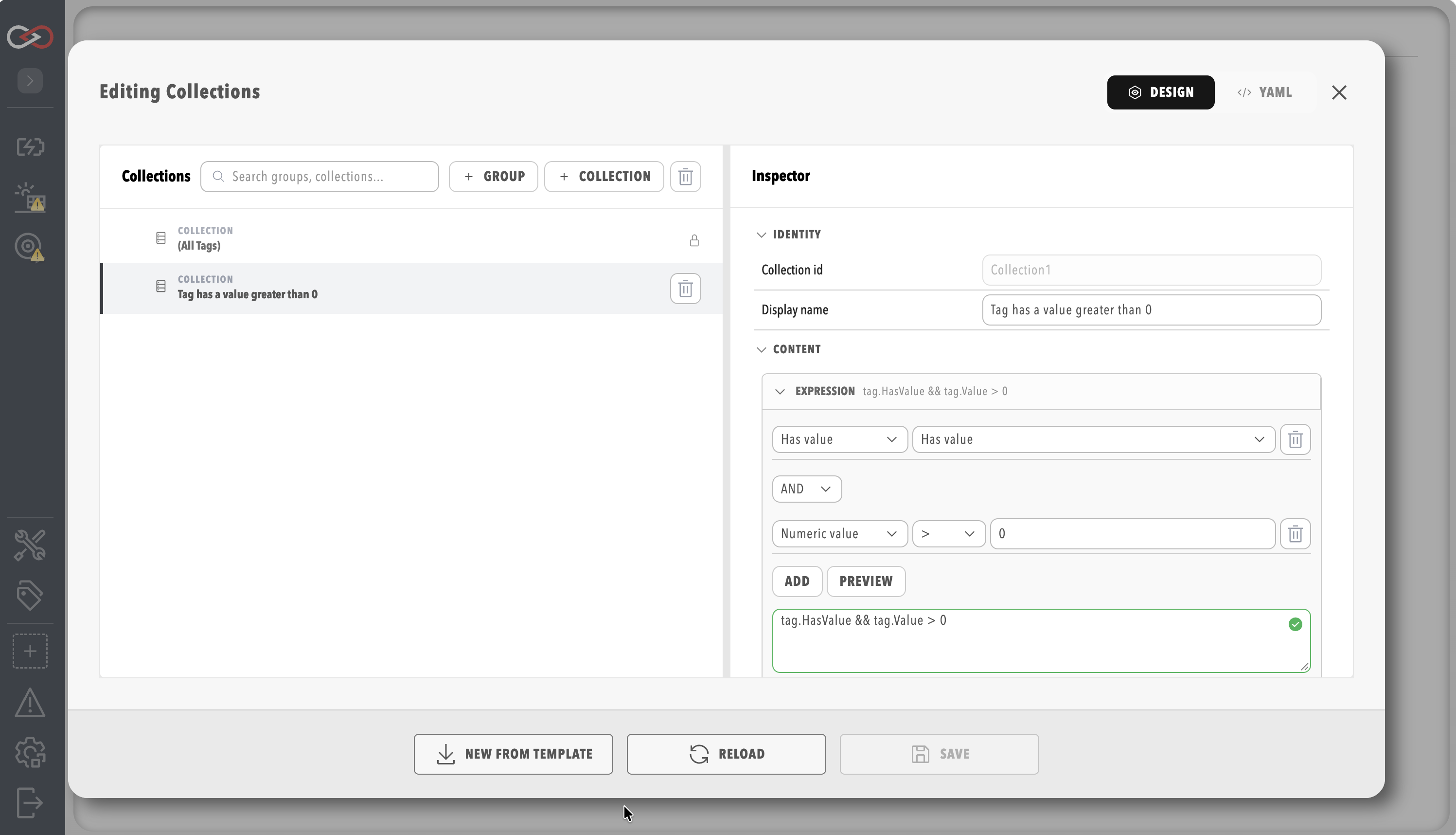
Select COLLECTIONS under TAG UTILITIES in the side menu. The collections editor opens as a window over the current page. The entry appears for users who hold the View tags and View tag collections permissions while a profile is loaded. Saving needs the Modify tag collections permission.
Groups and collections
The editor shows your collections as a tree, with the settings of the selected item beside it. A group organises collections into a hierarchy and passes its scope down to every collection inside it. A collection selects tags with a membership expression.
Names and scope
Give each collection a display name, which you can change at any time. Rules refer to a collection by its identifier, which stays the same when you rename it, so rules keep working after a rename.
The YAML is collections.yaml by default, in the collections folder of the profile directory, which is inside the artefacts directory, and Profinity reloads it when it changes.
Do not change an id in the YAML.
Profinity treats a changed id as a different collection, and rules that use the old id stop resolving.
When a logger, historian, Tag Relay Sender, or similar component asks you to pick Collections, the list shows each collection's display name.
Collections inside a group show the group path as Group / Display name (nested groups keep joining with /).
The profile still stores the collection identifier.
You can add one or more named collections, or the built-in (All Tags) collection on its own.
The Scope prefix, shown under Binding, limits a collection to the tags beneath a path in the tag tree.
A scope on a collection is added to the scope of its group.
For example, a group scoped to Vehicles/Car1 and a collection scoped to Battery together cover Vehicles/Car1/Battery.
To ignore the group's scope, start the collection's scope with /.
Saving and security
A collection needs a display name and an expression before it can be saved. A user who holds the Security administration permission can also limit who sees a collection, by choosing Restricted and listing the roles that are allowed to use it. The built-in (All Tags) collection is read-only.
Membership expression
Each collection filters candidate tags with a boolean expression over tag.
The guided builder, a form that assembles the expression for you, emits the published spellings.
Free text uses the same language.
Examples:
tag.MatchesPath("Elmar Solar MPPT") && tag.MatchesName("OutputCurrent")
tag.Meta.Type == "dbc.signal" && tag.HasValue
tag.Value > 0
tag.HasValue is true for a stale tag as well as a good one.
To keep only tags with a current value, use tag.HasValue && !tag.IsStale.
A logger or publisher re-checks which tags match its collection once per interval, so a filter on staleness is approximate by up to one interval.
Tag expressions describes the full expression vocabulary, covering path matching, values, metadata, and wildcards. For the rest of the tag layer, refer to Tag layer, Alerts Log, and Derived tags. Integrators can use the Endpoint reference.