InfluxDB and Prometheus Logging
Profinity provides the ability to both log and replay messages off your CAN bus network as well as the ability to log CAN bus data to timeseries databases like InfluxDB and Prometheus.
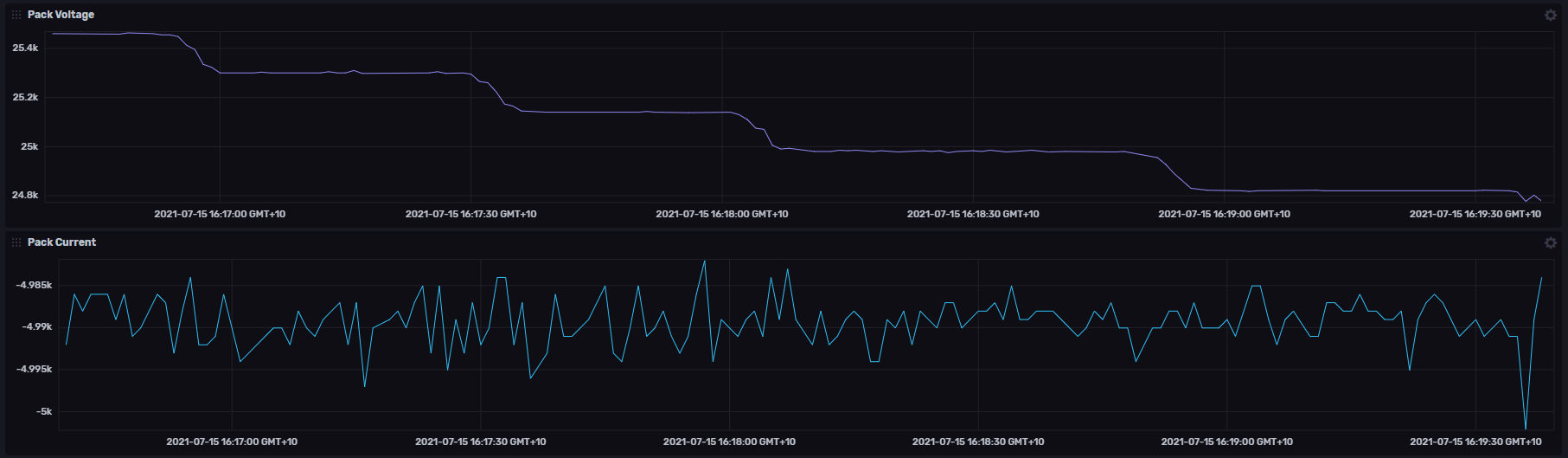
InfluxDB is an all in one solution with data storage and visualisation included in a single tool. Prometheus just provides data storage and is typically coupled with Grafana for visualisation.
All of these tools are available in commercially supported and Open Source (community supported) editions.
InfluxDB
InfluxDB V1, V2, and V3 are Separate, Incompatible Products
InfluxDB V1, V2, and V3 are separate, incompatible products with different APIs, authentication methods, and configuration requirements. You must select the correct logger type in Profinity that matches your InfluxDB installation. Using the wrong logger type will result in connection failures.
Profinity provides separate loggers for each InfluxDB version. Before adding an InfluxDB logger to your profile, you must know which version of InfluxDB you are using and select the appropriate logger type.
InfluxDB V1 Logger
InfluxDB V1 uses username/password authentication and the concept of databases (referred to as buckets in the configuration) and retention policies.
To log your CAN bus data to InfluxDB V1, first install InfluxDB V1 and get it up and running. Then add an InfluxDB V1 logger to your profile and configure the following options:
| Setting | Purpose |
|---|---|
| InfluxDB Database (Bucket) | What InfluxDB database do you want to store your data in? |
| InfluxDB Username | Username for InfluxDB authentication (leave blank for unsecured connections) |
| InfluxDB Password | Password for InfluxDB authentication (leave blank for unsecured connections) |
| InfluxDB Retention Policy | Retention policy for InfluxDB (default: "autogen") |
| InfluxDB URL | Endpoint URL that InfluxDB is running on |
| Dashboard URL | URL for the InfluxDB dashboard (optional, leave blank for no dashboard link) |
| InfluxDB Health Check | Asks the logger to regularly perform a health check on the connection |
| Logging Interval | How often should we send log data |
| Changes or Snapshot | Send all the changes or send a full snapshot of the current state |
Once these settings have been set correctly you should be able to see data flowing into InfluxDB V1. If you do not, check the Logs for more details.
InfluxDB Cloud HealthCheck Warning
InfluxDB cloud does not support the InfluxDB Health Check API and therefore you need to switch InfluxDB Health Check to false when using the cloud solution for storing your data.
InfluxDB V2 Logger
InfluxDB V2 uses token-based authentication and introduces the concepts of buckets and organizations, replacing the database and retention policy concepts from V1.
To log your CAN bus data to InfluxDB V2, first install InfluxDB V2 and get it up and running. Then add an InfluxDB V2 logger to your profile and configure the following options:
| Setting | Purpose |
|---|---|
| InfluxDB Bucket | What InfluxDB bucket do you want to store your data in? |
| InfluxDB Organisation | What InfluxDB organisation do you want to use? |
| InfluxDB Token | Security token for the user you are connecting to InfluxDB as |
| InfluxDB URL | Endpoint URL that InfluxDB is running on |
| Dashboard URL | URL for the InfluxDB dashboard (optional, leave blank for no dashboard link) |
| InfluxDB Health Check | Asks the logger to regularly perform a health check on the connection |
| Logging Interval | How often should we send log data |
| Changes or Snapshot | Send all the changes or send a full snapshot of the current state |
| Allow Retrieval | Allow data to be retrieved via this logger using the APIs |
Once these settings have been set correctly you should be able to see data flowing into InfluxDB V2. If you do not, check the Logs for more details.
InfluxDB Cloud HealthCheck Warning
InfluxDB cloud does not support the InfluxDB Health Check API and therefore you need to switch InfluxDB Health Check to false when using the cloud solution for storing your data.
InfluxDB V3 Logger
InfluxDB V3 uses token-based authentication and introduces the concept of databases, which replaces both the bucket and organization concepts from V2. V3 simplifies the data model by using a single database concept instead of the bucket/organization hierarchy.
To log your CAN bus data to InfluxDB V3, first install InfluxDB V3 and get it up and running. Then add an InfluxDB V3 logger to your profile and configure the following options:
| Setting | Purpose |
|---|---|
| InfluxDB Database | Database name for InfluxDB V3 (replaces Bucket and Organization concepts from V1/V2) |
| InfluxDB Token | Security token for the user you are connecting to InfluxDB as |
| InfluxDB URL | Endpoint URL that InfluxDB is running on |
| Dashboard URL | URL for the InfluxDB dashboard (optional, leave blank for no dashboard link) |
| InfluxDB Health Check | Asks the logger to regularly perform a health check on the connection |
| Logging Interval | How often should we send log data |
| Changes or Snapshot | Send all the changes or send a full snapshot of the current state |
| Allow Retrieval | Allow data to be retrieved via this logger using the APIs |
Once these settings have been set correctly you should be able to see data flowing into InfluxDB V3. If you do not, check the Logs for more details.
InfluxDB Cloud HealthCheck Warning
InfluxDB cloud does not support the InfluxDB Health Check API and therefore you need to switch InfluxDB Health Check to false when using the cloud solution for storing your data.
Changes vs Snapshot
When you send a Snapshot, Profinity will send every value currently stored in its DBC register to Influx on the interval. If you select On Change, then Profinity will send Influx a list of every change that has been recorded on the DBC message or signal during that time period. Depending on the resolution of measurement required, this allows you to choose between a high detail (high data) recording option or a lower detail (lower data) recording option.
Prometheus
Prometheus logging works in a completely different manner to InfluxDB logging.
Where InfluxDB expects its data to be pushed to it, Prometheus treats Profinity as a source of data, calling it and asking for the latest values. Prometheus also does not have graphing capability out of the box, rather it is usually coupled with a tool like Grafana to provide the graphing capability.
Adding a Prometheus device to Profinity is all that is required on the Profinity side to set it up for Prometheus logging. There are three configuration values that can be set :
| Setting | Purpose |
|---|---|
| Data Endpoint URL | What URL within the hostname and port should the Prometheus data be served on |
| Server Hostname | What adapter should the logger connect to on the local machine (could be an IP address) |
| Server Port | What port should the end point run on |
Once the device is active then Prometheus can call Profinity on this URL to receive data.
For example if you left everything as the default, the Profinity instance would be available on
Information on how to configure Prometheus to receive and display this data is covered in the Prometheus documentation.